December 15, 2025

Successful ERP Data Migration: Best Practices & Tips

Successful ERP Data Migration: Best Practices & Tips

Implementing a new ERP system can be a daunting task for many companies, particularly when it comes to migrating critical business data. Uncertainty around the data migration process often raises concerns about accuracy, downtime, and operational disruption.


However, with a clear understanding of best practices and a structured approach, data migration can be executed efficiently and reliably. Ensuring that inventory, customer, financial, and transactional data is accurately transferred is essential for a seamless ERP launch and for maintaining business continuity from day one.


In this blog, we’ll guide you through the essential stages of ERP data migration, highlight the most common challenges distributors face, and show how a structured approach can ensure a seamless ERP implementation that supports your business growth.

What is ERP Data Migration

ERP data migration is the structured process of transferring information from legacy systems into a new ERP platform. It’s far more than a technical task- it’s the foundation for accurate reporting, operational efficiency, and informed decision-making. Every department, from finance and sales to warehouse operations, relies on this data to function correctly.


A typical ERP data migration process follows the Extract, Transform, Load (ETL) methodology:


  • Extract: Securely pull data from legacy systems, spreadsheets, or other databases.


  • Transform: Clean, standardize, and restructure data to meet the new ERP’s rules and formats.


  • Load: Import validated data into the new system, ensuring it is ready for live operations.


Each stage requires careful planning and execution to avoid costly errors that can disrupt daily operations, customer service, and supplier relationships.


Done correctly, data migration helps organizations:


  • Improve reporting accuracy and financial closing speed
  • Maintain real-time inventory visibility
  • Enhance customer service with reliable order and shipment data
  • Ensure compliance with regulatory and auditing requirements

3 Key Data Types for ERP Data Migration

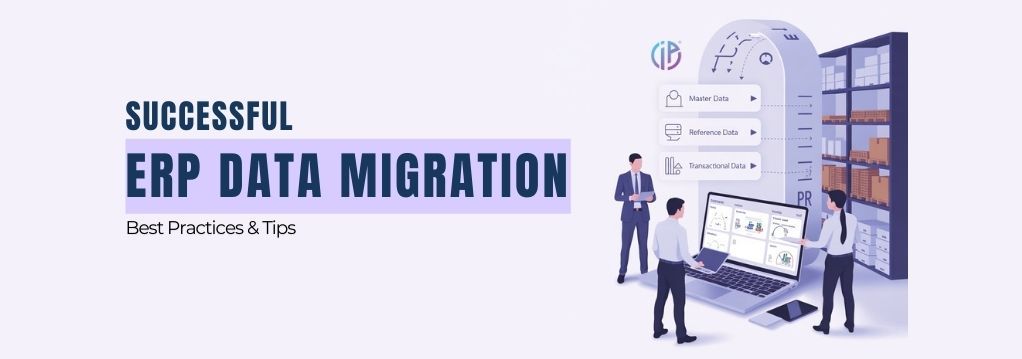
Successful ERP migration requires moving three core types of data, each serving a critical purpose:


  • Master Data: These are the foundational business entities referenced constantly, including customers, suppliers, and products. Accurate master data ensures orders, billing, and inventory management work flawlessly from day one.


  • Reference Data: This includes standardized terms like payment and delivery conditions, units of measure (UOM), chart of accounts, and tax codes. Proper migration of reference data ensures consistency across financial and operational reports.


  • Transactional Data: These records document day-to-day business activities, such as open orders, invoices, inventory balances, and general ledger entries. Migrating transactional data correctly ensures continuity and visibility in ongoing operations, preventing errors that could disrupt supply chain or financial reporting.

4 Major Challenges in ERP Data Migration

Even with a clear plan, ERP data migration is complex, and distributors often encounter obstacles that can derail the project.


1. Poor Data Quality and Cleansing


Legacy systems frequently house incomplete, outdated, or duplicate data. Duplicate entries for customers or products can cause billing errors and inventory mismatches, while inconsistent formats, such as “kg” versus “kilogram,” can break automated processes. Outdated pricing, warehouse locations, or stock levels can immediately impact order fulfillment if not corrected before migration.


2. Complex Data Structures and Inter-System Dependencies


ERP data is highly interconnected. For example, a sales order depends on accurate customer, product, pricing, and warehouse data. Migrating from multiple legacy systems or spreadsheets without careful mapping can lead to errors that ripple across the business, from operations to reporting.


3. Regulatory Compliance and Local Requirements


For Malaysian distributors, additional regulatory considerations increase the complexity of migration. Accurate mapping of tax codes, statutory reporting standards, and historical transaction values is essential. Businesses handling high-volume inventory and orders must execute migration with minimal downtime to avoid disrupting daily operations.


4. Lack of Skilled Resources and Clear Governance

Successful migration requires dedicated roles and strong project management. Without a Data Migration Specialist or Project Manager to oversee extraction, transformation, and loading, mistakes are likely. Coordination across finance, warehouse, and IT teams is critical, and governance structures must ensure that data is validated, complete, and accurate before go-live.

The 7 Stages of a Successful ERP Data Migration

A structured approach minimizes risk and ensures data integrity. iDCP follows a proven 7-stage methodology:


Stage 1: Assessment and Planning – Review legacy data quality, define scope, set timelines, and form a Data Governance Team.


Stage 2: Data Mapping – Create a blueprint for how legacy fields will fit into the new ERP, standardizing formats like units of measure and resolving inconsistencies.


Stage 3: Data Extraction – Securely pull all relevant master, reference, and transactional data from legacy systems using scripts, APIs, or native tools.


Stage 4: Data Cleansing and Transformation – Remove duplicates, correct inaccuracies, update outdated records, and ensure all data meets the new ERP standards.


Stage 5: Data Validation – Verify accuracy and completeness, reconcile totals, and ensure financial and operational data match across systems.


Stage 6: Data Loading – Import the data into the ERP system in phases, starting with master data, followed by reference and transactional data, to reduce risk.


Stage 7: Testing, Go-Live, and Sign-Off – Conduct user acceptance testing, validate business processes, and execute a controlled cutover to live operations with fallback plans in place.

How iDCP ERP Systems Supports Your Data Migration

At iDCP, we don’t just provide the ERP software, we act as your partner in data migration. Our team brings proven methodology, technical expertise, and hands-on guidance to ensure your data is accurate, validated, and fully aligned with your new ERP. We work closely with your team, providing a structured plan and execution support so you can focus on running your business while we handle the technical complexities.


Ready to see how our proven migration plan can secure a smooth ERP launch for your business? Contact iDCP ERP Systems today to schedule a demo and discuss your migration timeline.

Frequently Asked Questions (FAQs)- ERP Data Migration

  • What is ERP data migration?

    ERP data migration is the process of transferring critical business data, such as customer records, inventory, financials, and transactional history- from legacy systems to a new ERP platform. This ensures consistent, accurate information for all departments and is essential for a smooth ERP implementation.

  • Why is data migration important for ERP implementation?

    Accurate data migration is critical because ERP systems rely on clean, structured data for operations. Errors or incomplete data can disrupt workflows, affect decision-making, and delay the ERP go-live. Proper migration ensures business continuity and maximizes the ROI of your ERP investment.

  • What are the common challenges in ERP data migration?

    Common challenges include poor data quality, duplicate or inconsistent records, complex interlinked data, multiple data sources, and compliance requirements. Addressing these challenges early helps prevent operational disruptions and project delays.

  • What types of data need to be migrated in ERP?

    ERP data migration typically involves three main types:


    • Master Data: Customers, suppliers, products/items.

    • Reference Data: Units of measure, tax codes, chart of accounts.

    • Transactional Data: Open inventory, sales orders, invoices, and financial balances.


  • How can companies ensure a successful ERP data migration?

    Success depends on careful planning, data cleansing, accurate mapping, validation, phased migration, and continuous testing. Partnering with experienced ERP vendors who follow a proven methodology can significantly reduce risk.

  • How long does ERP data migration take?

    The duration varies depending on data volume, complexity, and quality. With proper preparation and a structured approach, most mid-sized chain-store retail distribution and trading companies can complete migration within a few weeks.

  • Do we need to migrate all historical data to a new ERP system?

    Not necessarily. A selective migration strategy is recommended—only move operationally critical or legally required data. Archiving obsolete data reduces complexity, speeds up migration, and improves system performance.

  • Can an ERP vendor handle both the software and the data migration process?

    Yes. Leading ERP vendors, like iDCP ERP Systems, provide full-service support, delivering the ERP software along with a structured data migration plan. This ensures accurate, validated data and a smooth go-live with minimal business disruption.

Key Takeaways


ERP data migration is not just a technical task, it’s a business-critical process that ensures operational continuity, accurate reporting, and seamless workflows. By following a structured, 7-stage approach and partnering with an experienced vendor like iDCP ERP Systems, distributors can avoid common pitfalls, reduce risk, and start realizing the benefits of a modern ERP system immediately.


💡 iDCP Systems — We Build Business Confidence.


🌐 Learn more at www.idcp.my or call iDCP +6012-9379260 to request a system demo.


iDCP Systems

iDCP Systems


iDCP Systems offers a full suite of cloud solutions tailored for distribution and retail businesses. Our offerings- from our core ERP platform to our advanced POS system, powerful mobile app, and specialized solution add-ons- help companies digitalize operations and manage multi-channel sales to scale with confidence.

Read Next Blogs


What Is a SKU? A Practical Guide for Retail & Consignment
By Marketing January 8, 2026
Learn how SKU numbers work, why retailers use SKUs, and how SKUs help manage inventory, omnichannel sales, and consignment stock in modern retail businesses.
Malaysia's Top 10 ERP Software for Trading, wholesale and distribution
By Digital Marketing November 25, 2025
Top 10 ERP systems in Malaysia for 2026. Learn how iDCP ERP helps trading and wholesale businesses scale, automate, and gain real-time visibility.
10 best retail pos systems in Malaysia with real-time sales data
By Digital Marketing November 11, 2025
Discover the 10 best retail POS systems in Malaysia for 2025. Compare features, pricing, and why iDCP Retail POS is ideal for fashion and fast-growing multi-outlet stores.

Scale your Business with iDCP

Don’t let challenges stop your growth — together, we’ll deliver better results.

Contact Us